Wednesday, 11 April 2012

Adobe Reader adds pdf annotation, scribbling, highlighting, signing, and form filling


Adobe Reader is probably the worst PDF reader for Windows, but things are different in the Android world.

There are plenty of PDF readers for Android out there, but they're either overpriced, fail to reflow text, etc.

Surprisingly, the Android version of Adobe Reader does a pretty good job. It reflows text, shows it in pages or as a continuous scroll, and the latest version adds a few more goodies.

The new edition behaves a bit more like paper. It lets you annotate your PDFs, scribble and draw on them, highlight text with fluorescent colors, fill forms, and sign them too. So if you want to chain someone to an unbreakable legally binding contract you can add Adobe Reader to your stash of weapons.

• Adobe Reader


tweet this reddit digg this StumbleUpon digg this digg this

Tuesday, 3 April 2012

Optimize Toolbox speaks english again


All-in-one (to be precise: 15-in-one and counting) Android toolkit Optimize Toolbox didn't make new friends when an update made the app speak chinese and nothing else.

But the latest update made the app speaks english again!

Why that matters? Because some of its 15 features are quite useful. A startup timer, a pretty good app manager, and a running apps and processes tab that beats the stock app settings menu in terms of speed and usability.

The dead pixel detector is a nice touch too, but its well hidden in the new edition. You have to grab a helper app called DeviceMark to get the dead pixel finder screens back. Or you could simply toggle the background colors of any drawing app to do the same thing.

The user interface of Optimize Toolbox looks a bit slicker too. No more need to stick with the old version.

Many features of Optimize Toolbox require root access. You may want to use DroidWall or LBE Privacy Guard to keep Optimize Toolbox offline.

• Optimize Toolbox Lite version (Android Market) (Play Store) English again, but check the store feedback to see if they didn't go all chinese again.
• Optimize Toolbox version 2.0.9 (android underground) This old version speaks english for sure.


tweet this reddit digg this StumbleUpon digg this digg this

Monday, 2 April 2012

GO Backup has a long way to go

Google Android
Titanium and MyBackup are the Coke and Pepsi of the Android backup apps. They back up your messages, apps, contacts, settings, and just about everything else you'd like to back up to recover from data loss disasters, or to get your things back when you switch ROMs. Both apps have one more thing in common: they don't back up your widgets.

And now GO Backup tries to squeeze in between the big two.

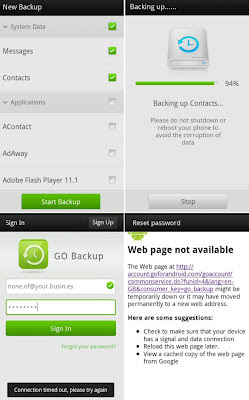
GO Backup backs up your contacts, messages, apps, and app settings. Just like Titanium and MyBackup, backing up your app settings requires root access, but if you're reading this your phone is probably rooted and running a custom ROM already.

There are some major flaws that need to be fixed before GO Backup can go be a serious contender.

GO Backup doesn't back up your playlists, calendar, paired bluetooth devices, WiFi access points, or Android settings. It won't back up your MMSs either, not even the text part. And you can't choose your own backup folder, so the only way to put your GO backups in your Dropbox folder is if you fire up your file manager to move 'em in by hand.

But the worst part is that you have to create an account with an email address. A fake email will work, but that's not the point. The problem is that you need to be signed in before GO Backup backs up anything. And what's absolutely unforgivable: you have to be signed in to restore your backups, even if they're sitting on your very own SD card.

No internet connection available because you're roaming abroad and you're out of free WiFi range? Too bad, but that's a no go for GO. Even if your internet is up and running the servers of GO may be out of order, and then you're still locked out of your backups. When I couldn't connect to GO the only way to use the app was by restoring a Titanium backup from back when I was still logged in. Having to use Titanium before I can use GO... irony doesn't get much better than that!

Right now GO Backup only has one thing going for it: batch restoring your apps and their settings for free, a feature for which both Titanium and MyBackup demand money. I'd still use the free version of MyBackup for my data, though.

If we give GO some time they may turn the app into a real Titanium or MyBackup alternative, but they're nowhere near there yet. Let's hope they fix the flaws before falling for the temptation of featuritis.

• GO Backup


tweet this reddit digg this StumbleUpon digg this digg this

Sunday, 1 April 2012

Samsung MyTouch Vivid One 3D announced!!!

Google Android
Finally! The rumors were all over the web, but now we have the first real hard pumping evidence of the upcoming new product that we're all anxiously waiting for!

Will it have 4G, 5G, 6G, and NFC? What about a 3D screen made of superunbreakable Chimpansee Glass? Are we gonna see the return of the infrared sensor? Did they really ditch the volume rocker for a brainwave-sensitive mindpad? And is it gonna make Siri eat herself to death on chocolate and ice cream sandwiches?

After all the other Android sites scored with leaked photos and prematurely released spec sheets Android Underground is the FIRST to show you a real action picture of the brand new LG Sony Samsung Bionic Incredible G2 One Nexus which will soon be available from a carrier near you. Yes, it makes Apple wish it was never born. Yes, it makes coffee too. And if you flash a specially modded custom ROM it will even make phone calls!

To all the poor Android phone manufacturers who have a hard time naming their newborn babies: DON'T PANIC! There's light at the end of the tunnel.

Fire your marketing department, stop breaking your head over things like Droid Galaxy Nexus S3 or HTC Samsung 5G Ultimate Plus and head straight to:

• The Android Phone Name Generator


tweet this reddit digg this StumbleUpon digg this digg this